






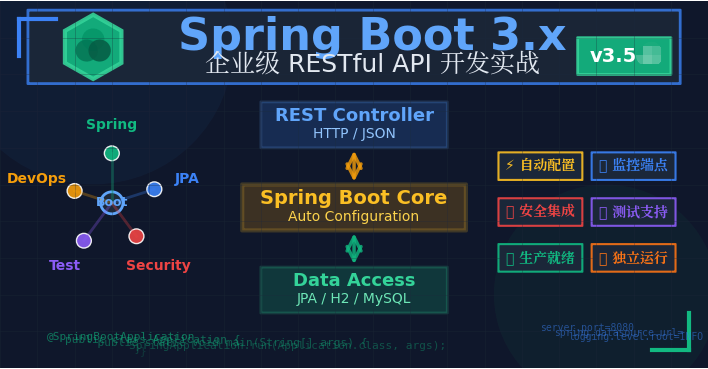
摘要:本文章面向 Java 初学者和想快速上手 Spring Boot 的开发者,通过构建一个完整的图书管理 API,讲解自动配置、数据持久化、安全控制、异常处理和测试等核心特性。全程使用 Spring Boot 3.5.10 版本,无需复杂环境配置,15 分钟即可运行第一个应用。
1. 为什么选择 Spring Boot?
Spring Boot 是 Spring 生态的"开箱即用"解决方案,其核心理念是约定优于配置(Convention Over Configuration)。它解决了传统 Spring 开发的痛点:
| 传统 Spring | Spring Boot |
|---|---|
| 大量 XML 配置 | 自动配置,零 XML |
| 依赖版本冲突 | Starter 统一管理 |
| 部署复杂 | 内嵌服务器,独立运行 |
| 生产环境配置繁琐 | 内置监控、健康检查 |
2. 项目初始化:Spring Initializr 极速启动
2.1 生成基础项目
访问 start.spring.io,选择:
-
Project: Maven
-
Language: Java 17+
-
Spring Boot: 3.5.10
-
Dependencies: Spring Web, Spring Data JPA, H2 Database, Thymeleaf, Spring Security
2.2 核心依赖解析
<parent>
    <groupId>org.springframework.boot</groupId>
    <artifactId>spring-boot-starter-parent</artifactId>
    <version>3.5.4</version>
    <relativePath/>
</parent>

<dependencies>
    <!-- Web 开发:内嵌 Tomcat + Spring MVC -->
    <dependency>
        <groupId>org.springframework.boot</groupId>
        <artifactId>spring-boot-starter-web</artifactId>
    </dependency>

    <!-- 数据访问:JPA + 连接池 -->
    <dependency>
        <groupId>org.springframework.boot</groupId>
        <artifactId>spring-boot-starter-data-jpa</artifactId>
    </dependency>

    <!-- 内存数据库:零配置,即开即用 -->
    <dependency>
        <groupId>com.h2database</groupId>
        <artifactId>h2</artifactId>
        <scope>runtime</scope>
    </dependency>
</dependencies>
Starter 机制:
spring-boot-starter-xxx 是 Spring Boot 的"一站式"依赖包,自动引入相关库并配置好版本兼容性。3. 应用配置:自动配置的魔法
3.1 主启动类
@SpringBootApplication
public class Application {
    public static void main(String[] args) {
        SpringApplication.run(Application.class, args);
    }
}
@SpringBootApplication 是一个组合注解,等同于:-
@Configuration:标记配置类 -
@EnableAutoConfiguration:启用自动配置 -
@ComponentScan:自动扫描组件
3.2 配置文件
# application.properties
server.port=8081
spring.application.name=图书管理系统

# 日志级别
logging.level.org.springframework.web=DEBUG配置优先级:命令行参数 > 外部配置文件 > 内部配置文件 > 默认配置
4. 前端展示:Thymeleaf 模板引擎
4.1 添加依赖
<dependency>
    <groupId>org.springframework.boot</groupId>
    <artifactId>spring-boot-starter-thymeleaf</artifactId>
</dependency>
Spring Boot 自动配置 Thymeleaf,无需额外设置。
4.2 控制器与视图
@Controller
public class HomeController {

    @Value("${spring.application.name}")
    private String appName;

    @GetMapping("/")
    public String home(Model model) {
        model.addAttribute("appName", appName);
        return "home";  // 对应 templates/home.html
    }
}
4.3 页面模板
<!-- src/main/resources/templates/home.html -->
<!DOCTYPE html>
<html xmlns:th="http://www.thymeleaf.org">
<head>
    <meta charset="UTF-8">
    <title th:text="${appName}">首页</title>
    <style>
        body { font-family: 'Segoe UI', sans-serif; max-width: 800px; margin: 50px auto; }
        h1 { color: #2c3e50; }
        .highlight { color: #e74c3c; font-weight: bold; }
    </style>
</head>
<body>
    <h1>欢迎使用 <span class="highlight" th:text="${appName}">系统</span></h1>
    <p>基于 Spring Boot 3.x 构建的高性能应用</p>
</body>
</html>
5. 安全控制:Spring Security 快速配置
5.1 引入安全模块
<dependency>
    <groupId>org.springframework.boot</groupId>
    <artifactId>spring-boot-starter-security</artifactId>
</dependency>注意:一旦引入该依赖,所有端点默认需要认证(HTTP Basic 或表单登录)。
5.2 自定义安全配置
@Configuration
@EnableWebSecurity
public class SecurityConfig {

    @Bean
    public SecurityFilterChain filterChain(HttpSecurity http) throws Exception {
        http
            .authorizeHttpRequests(auth -> auth
                .requestMatchers("/", "/home", "/api/books/**").permitAll()  // 公开端点
                .anyRequest().authenticated()
            )
            .csrf(csrf -> csrf.ignoringRequestMatchers("/api/**"))  // API 端点禁用 CSRF
            .httpBasic(Customizer.withDefaults());
        return http.build();
    }

    @Bean
    public PasswordEncoder passwordEncoder() {
        return new BCryptPasswordEncoder();
    }
}
Spring Boot 3.x 变化:使用
SecurityFilterChain Bean 替代继承 WebSecurityConfigurerAdapter。6. 数据持久化:JPA + H2 零配置方案
6.1 实体类定义
@Entity
@Table(name = "books")
public class Book {

    @Id
    @GeneratedValue(strategy = GenerationType.IDENTITY)
    private Long id;

    @Column(nullable = false, unique = true, length = 100)
    private String title;

    @Column(nullable = false, length = 50)
    private String author;

    @Column(name = "publish_date")
    private LocalDate publishDate;

    // 构造函数、Getter/Setter
    public Book() {}

    public Book(String title, String author) {
        this.title = title;
        this.author = author;
    }
}
6.2 数据访问层
@Repository
public interface BookRepository extends JpaRepository<Book, Long> {

    // 方法名派生查询
    List<Book> findByTitleContainingIgnoreCase(String title);

    List<Book> findByAuthorOrderByPublishDateDesc(String author);

    // JPQL 自定义查询
    @Query("SELECT b FROM Book b WHERE b.publishDate > :date")
    List<Book> findRecentBooks(@Param("date") LocalDate date);
}
Spring Data JPA 优势:无需编写实现类,接口方法名自动解析为 SQL。
6.3 数据库配置
# H2 内存数据库配置
spring.datasource.url=jdbc:h2:mem:bookdb;DB_CLOSE_DELAY=-1;DB_CLOSE_ON_EXIT=FALSE
spring.datasource.driver-class-name=org.h2.Driver
spring.datasource.username=sa
spring.datasource.password=

# JPA 配置
spring.jpa.hibernate.ddl-auto=update
spring.jpa.show-sql=true
spring.jpa.properties.hibernate.format_sql=true

# H2 控制台(开发环境)
spring.h2.console.enabled=true
spring.h2.console.path=/h2-console
7. RESTful API 开发:图书管理控制器
7.1 完整 CRUD 实现
@RestController
@RequestMapping("/api/books")
@Validated
public class BookController {

    private final BookRepository bookRepository;

    // 构造函数注入(推荐)
    public BookController(BookRepository bookRepository) {
        this.bookRepository = bookRepository;
    }

    @GetMapping
    public ResponseEntity<List<Book>> getAllBooks() {
        return ResponseEntity.ok(bookRepository.findAll());
    }

    @GetMapping("/{id}")
    public ResponseEntity<Book> getBook(@PathVariable @Positive Long id) {
        return bookRepository.findById(id)
                .map(ResponseEntity::ok)
                .orElseThrow(() -> new BookNotFoundException("图书不存在: " + id));
    }

    @GetMapping("/search")
    public ResponseEntity<List<Book>> searchByTitle(@RequestParam String keyword) {
        return ResponseEntity.ok(bookRepository.findByTitleContainingIgnoreCase(keyword));
    }

    @PostMapping
    public ResponseEntity<Book> createBook(@Valid @RequestBody Book book) {
        Book saved = bookRepository.save(book);
        URI location = ServletUriComponentsBuilder
                .fromCurrentRequest()
                .path("/{id}")
                .buildAndExpand(saved.getId())
                .toUri();

        return ResponseEntity.created(location).body(saved);
    }

    @PutMapping("/{id}")
    public ResponseEntity<Book> updateBook(
            @PathVariable Long id,
            @Valid @RequestBody Book book) {
        if (!id.equals(book.getId())) {
            throw new BookIdMismatchException("路径 ID 与实体 ID 不一致");
        }

        bookRepository.findById(id)
                .orElseThrow(() -> new BookNotFoundException("图书不存在: " + id));

        return ResponseEntity.ok(bookRepository.save(book));
    }

    @DeleteMapping("/{id}")
    @ResponseStatus(HttpStatus.NO_CONTENT)
    public void deleteBook(@PathVariable Long id) {
        Book book = bookRepository.findById(id)
                .orElseThrow(() -> new BookNotFoundException("图书不存在: " + id));
        bookRepository.delete(book);
    }
}
7.2 API 设计规范
| 操作 | 方法 | 端点 | 状态码 |
|---|---|---|---|
| 查询全部 | GET | /api/books | 200 OK |
| 查询单个 | GET | /api/books/{id} | 200 OK / 404 Not Found |
| 创建 | POST | /api/books | 201 Created |
| 更新 | PUT | /api/books/{id} | 200 OK |
| 删除 | DELETE | /api/books/{id} | 204 No Content |
8. 异常处理:统一响应格式
8.1 自定义异常
public class BookNotFoundException extends RuntimeException {
    public BookNotFoundException(String message) {
        super(message);
    }
}

public class BookIdMismatchException extends RuntimeException {
    public BookIdMismatchException(String message) {
        super(message);
    }
}
8.2 全局异常处理器
@RestControllerAdvice
public class GlobalExceptionHandler {

    @ExceptionHandler(BookNotFoundException.class)
    public ResponseEntity<ErrorResponse> handleNotFound(BookNotFoundException ex) {
        ErrorResponse error = new ErrorResponse(
            HttpStatus.NOT_FOUND.value(),
            "资源不存在",
            ex.getMessage(),
            LocalDateTime.now()
        );
        return ResponseEntity.status(HttpStatus.NOT_FOUND).body(error);
    }

    @ExceptionHandler(BookIdMismatchException.class)
    public ResponseEntity<ErrorResponse> handleBadRequest(BookIdMismatchException ex) {
        ErrorResponse error = new ErrorResponse(
            HttpStatus.BAD_REQUEST.value(),
            "请求参数错误",
            ex.getMessage(),
            LocalDateTime.now()
        );
        return ResponseEntity.badRequest().body(error);
    }

    @ExceptionHandler(MethodArgumentNotValidException.class)
    public ResponseEntity<ErrorResponse> handleValidation(MethodArgumentNotValidException ex) {
        String message = ex.getBindingResult().getFieldErrors().stream()
                .map(e -> e.getField() + ": " + e.getDefaultMessage())
                .collect(Collectors.joining(", "));

        ErrorResponse error = new ErrorResponse(
            HttpStatus.BAD_REQUEST.value(),
            "数据校验失败",
            message,
            LocalDateTime.now()
        );
        return ResponseEntity.badRequest().body(error);
    }

    @ExceptionHandler(Exception.class)
    public ResponseEntity<ErrorResponse> handleGeneric(Exception ex) {
        ErrorResponse error = new ErrorResponse(
            HttpStatus.INTERNAL_SERVER_ERROR.value(),
            "服务器内部错误",
            "请联系管理员",
            LocalDateTime.now()
        );
        return ResponseEntity.status(HttpStatus.INTERNAL_SERVER_ERROR).body(error);
    }
}
8.3 统一错误响应格式
public record ErrorResponse(
    int status,
    String error,
    String message,
    LocalDateTime timestamp
) {}
9. 测试策略:分层测试实战
9.1 上下文加载测试
@SpringBootTest
@AutoConfigureMockMvc
public class ApplicationContextTest {

    @Test
    void contextLoads() {
        // 验证应用上下文能正常启动
    }
}
9.2 集成测试(REST Assured)
<dependency>
    <groupId>io.rest-assured</groupId>
    <artifactId>rest-assured</artifactId>
    <version>5.5.5</version>
    <scope>test</scope>
</dependency>
@SpringBootTest(webEnvironment = SpringBootTest.WebEnvironment.RANDOM_PORT)
public class BookApiIntegrationTest {
@LocalServerPort
private int port;
@Autowired
private BookRepository repository;
@BeforeEach
void setUp() {
RestAssured.port = port;
repository.deleteAll(); // 清理数据
}
private Book createTestBook(String title, String author) {
Book book = new Book(title, author);
return repository.save(book);
}
@Test
void shouldReturnAllBooks() {
createTestBook("Spring Boot 实战", "张三");
createTestBook("Java 核心技术", "李四");
given()
.when()
.get("/api/books")
.then()
.statusCode(200)
.body("size()", equalTo(2))
.body("[0].title", equalTo("Spring Boot 实战"));
}
@Test
void shouldCreateNewBook() {
Book newBook = new Book("微服务设计", "王五");
given()
.contentType(ContentType.JSON)
.body(newBook)
.when()
.post("/api/books")
.then()
.statusCode(201)
.header("Location", containsString("/api/books/"))
.body("title", equalTo("微服务设计"))
.body("id", notNullValue());
}
@Test
void shouldReturn404WhenBookNotFound() {
given()
.when()
.get("/api/books/99999")
.then()
.statusCode(404)
.body("error", equalTo("资源不存在"));
}
@Test
void shouldValidateBookData() {
Book invalidBook = new Book("", ""); // 违反 @NotBlank 约束
given()
.contentType(ContentType.JSON)
.body(invalidBook)
.when()
.post("/api/books")
.then()
.statusCode(400)
.body("error", equalTo("数据校验失败"));
}
}9.3 单元测试(Mockito)
@ExtendWith(MockitoExtension.class)
class BookControllerUnitTest {

    @Mock
    private BookRepository repository;

    @InjectMocks
    private BookController controller;

    @Test
    void shouldReturnBookWhenFound() {
        // Given
        Book book = new Book("测试书名", "作者");
        book.setId(1L);
        when(repository.findById(1L)).thenReturn(Optional.of(book));

        // When
        ResponseEntity<Book> response = controller.getBook(1L);

        // Then
        assertEquals(200, response.getStatusCodeValue());
        assertEquals("测试书名", response.getBody().getTitle());
    }
}
10. 生产就绪:监控与部署
10.1 Actuator 监控
<dependency>
    <groupId>org.springframework.boot</groupId>
    <artifactId>spring-boot-starter-actuator</artifactId>
</dependency>
# 暴露所有端点
management.endpoints.web.exposure.include=*
management.endpoint.health.show-details=always10.2 打包与运行
# Maven 打包
mvn clean package

# 运行
java -jar target/book-management-0.0.1-SNAPSHOT.jar

# 生产环境配置
java -jar -Dspring.profiles.active=prod target/book-management.jar
11. 总结与学习路径
本文章覆盖知识点
✅ 自动配置:理解 Spring Boot 如何减少样板配置
✅ 数据访问:JPA 与 Spring Data 的快速开发模式
✅ RESTful API:规范的 HTTP API 设计与实现
✅ 异常处理:全局异常处理与统一响应格式
✅ 安全控制:Spring Security 的基础配置
✅ 测试策略:单元测试与集成测试的最佳实践
✅ 数据访问:JPA 与 Spring Data 的快速开发模式
✅ RESTful API:规范的 HTTP API 设计与实现
✅ 异常处理:全局异常处理与统一响应格式
✅ 安全控制:Spring Security 的基础配置
✅ 测试策略:单元测试与集成测试的最佳实践
进阶学习建议
-
数据库迁移:学习 Flyway/Liquibase 管理 Schema
-
缓存优化:集成 Redis 提升性能
-
异步处理:使用 @Async 和 Spring 事件机制
-
微服务:Spring Cloud 与分布式系统
-
容器化:Docker 与 Kubernetes 部署